# OpenSlop - full site text
> Every page on https://openslop.ai concatenated. Generated from the same source as the HTML.
# OpenSlop - Free Open-Source AI Content Creator
> Free open-source AI video pipeline. A single prompt becomes a finished video - no GPU, no manual editing.
OpenSlop is a free, open-source AI video creation pipeline that turns a single prompt into a finished video. It is model-agnostic: it works with every LLM, image, video, voice, and music provider - Claude, GPT, Gemini, FLUX, Seedream, Kling, Veo, Sora, ElevenLabs, Cartesia, Speechify, Suno, and dozens more - and orchestrates whichever you choose into one automated workflow that runs on your own API keys.
It is built for faceless YouTube, TikTok, and Shorts creators who want to publish AI-generated video at scale without paying for an all-in-one tool that produces generic output. Everything is modular: swap any model, edit any stage, keep every asset.
## One prompt, a finished video
Describe the video you want and OpenSlop writes the script, storyboards every beat, generates the images, animates the shots worth animating, records the narration, scores the music, and assembles the final cut. There is no timeline to drag and no render farm to rent - the pipeline runs end to end and hands back a publish-ready file.
## Every model stays swappable
No provider is privileged and none is required. Every LLM can write the script, every image or video model can render the shots, and every TTS voice can narrate, so a new image model or a cheaper TTS provider is a config change rather than a rewrite. Bring your own API keys, mix providers per stage, and keep the intermediate assets - scripts, shot lists, stills, audio stems - as ordinary files you own. The full provider list - LLMs, image, video, voice, music, lip sync, and inference routers - is in [AGENTS.md](https://openslop.ai/AGENTS.md).
## Scripts that don't sound like a model wrote them
OpenSlop scripts with narrative diffusion, a multi-pass method that drafts, critiques, and rewrites a script before a single frame is generated. Characters keep their faces across shots, pacing follows a retention curve instead of a template, and the narration reads like a person rather than a summary.
## Open-source and free forever
The pipeline is open source on GitHub and free to run. You pay the model providers directly at cost - there is no per-video markup, no seat pricing, and no watermark. Self-host it, fork it, or wire it into an existing content workflow.
---
Canonical URL: https://openslop.ai/
---
# About OpenSlop
> OpenSlop is an open-source AI media generation pipeline built by engineers from Meta, Google, Stripe, and Dropbox.
## Our Mission
OpenSlop is building an AI-powered media generation platform that makes it easy to create high-quality video, music, images, and narration from simple text prompts. We believe creative tools should be accessible to everyone.
## The Team
We're a small team of engineers from companies like Meta, Google, Stripe, and Dropbox who are passionate about the intersection of AI and creativity. We're building OpenSlop to push the boundaries of what's possible with generative media.
## Contact Us
Have questions, feedback, or partnership inquiries? We'd love to hear from you.
- **Email:** [hi@openslop.ai](mailto:hi@openslop.ai)
---
Canonical URL: https://openslop.ai/about
---
# Contact OpenSlop
> How to reach the OpenSlop team - email, Discord, GitHub issues, press, and security reports.
OpenSlop is maintained by a small team that reads everything it receives. Whichever channel you pick below reaches a person, and we aim to reply to email within two business days.
## Email
General questions, beta access, partnership and press inquiries: [hi@openslop.ai](mailto:hi@openslop.ai). This is the right address for anything that is not a code issue - billing questions about provider keys, help planning a channel, or a request to talk to the team about using OpenSlop at scale.
## Community
Join the [OpenSlop Discord](https://discord.gg/zeP5482ced) to compare pipeline configs, share prompts and model settings, and get help from other creators in real time. The maintainers are in the server most days and it is the fastest way to get an answer about a specific model or provider.
## Bugs and feature requests
The pipeline is developed in the open at [github.com/openslop/openslop](https://github.com/openslop/openslop). File an issue there for bugs, provider integrations, and feature requests, and open a pull request if you have a fix - contributions are reviewed by the core team.
## Mailing address
OpenSlop, 555 San Antonio Rd, Mountain View, CA 94040, United States. Post reaches us slowly - email is faster for anything time-sensitive.
## Security and privacy
Report a suspected vulnerability privately to [hi@openslop.ai](mailto:hi@openslop.ai) rather than in a public issue, and we will acknowledge it before disclosing anything. For data access, correction, or deletion requests, use the same address and see our [Privacy Policy](https://openslop.ai/privacy) for what we collect and how long we keep it.
---
Canonical URL: https://openslop.ai/contact
---
# OpenSlop Developer Resources
> Source code, agent instructions, machine-readable endpoints, and integration notes for building on OpenSlop.
Everything an engineer or an AI agent needs to work with OpenSlop lives at a predictable URL. The pipeline itself is a self-hosted open-source project rather than a hosted API, so integration means running or extending the repository.
## Source code
The OpenSlop pipeline is open source at [github.com/openslop/openslop](https://github.com/openslop/openslop). The repository README covers installation, the provider keys each stage expects, and how to run a full generation locally. Each pipeline stage - scripting, storyboarding, image generation, animation, narration, music, assembly - is a module you can replace.
## Agent instructions
Agents should start at [/AGENTS.md](https://openslop.ai/AGENTS.md), which states when OpenSlop is the right tool, what it cannot do, and how to call it. [/llms.txt](https://openslop.ai/llms.txt) is the machine-readable index of this site and [/llms-full.txt](https://openslop.ai/llms-full.txt) concatenates the full text of every page for retrieval.
## Markdown endpoints
Every page on openslop.ai is available as Markdown. Send `Accept: text/markdown` to any URL, or append `.md` to the path - [/developers.md](https://openslop.ai/developers.md) and [/blog.md](https://openslop.ai/blog.md) both work. Responses set `Vary: Accept` so caches keep the HTML and Markdown variants apart, per [acceptmarkdown.com](https://acceptmarkdown.com).
## Feeds and site metadata
New posts are published to the [RSS feed](https://openslop.ai/feed.xml). The [sitemap](https://openslop.ai/sitemap.xml) lists every canonical URL, and [robots.txt](https://openslop.ai/robots.txt) points crawlers at both. There is no hosted REST API, no OAuth flow, and no webhook system today - if you need one, tell us at [hi@openslop.ai](mailto:hi@openslop.ai).
---
Canonical URL: https://openslop.ai/developers
---
# Privacy Policy
> What OpenSlop collects, how it is used, and your rights.
_Last updated: February 15, 2026_
## 1. Information We Collect
We may collect the following types of information when you use OpenSlop:
- **Account information:** name, email address, and other details you provide when signing up
- **Usage data:** how you interact with the Service, including pages visited, features used, and timestamps
- **Device information:** browser type, operating system, IP address, and device identifiers
## 2. How We Use Your Information
We use the information we collect to:
- Provide, maintain, and improve the Service
- Communicate with you about updates, security alerts, and support
- Analyze usage patterns to enhance user experience and performance
- Comply with legal obligations and enforce our Terms
## 3. Data Sharing
We do not sell your personal information. We may share data with third parties only in the following circumstances:
- With service providers who assist us in operating the Service
- When required by law or to protect our legal rights
- In connection with a merger, acquisition, or sale of assets
## 4. Cookies
We use cookies and similar technologies to remember your preferences, understand how you use the Service, and improve your experience. You can control cookie settings through your browser preferences.
## 5. Data Security
We implement reasonable technical and organizational measures to protect your personal information. However, no method of transmission over the Internet is completely secure, and we cannot guarantee absolute security.
## 6. Data Retention
We retain your personal information for as long as your account is active or as needed to provide the Service. You may request deletion of your data by contacting us.
## 7. Your Rights
Depending on your location, you may have the right to access, correct, delete, or port your personal data. To exercise these rights, please contact us at the address below.
## 8. Changes to This Policy
We may update this Privacy Policy from time to time. We will notify you of material changes by posting the updated policy on this page with a revised "Last updated" date.
## 9. Contact Us
If you have questions about this Privacy Policy, please contact us at [hi@openslop.ai](mailto:hi@openslop.ai).
---
Canonical URL: https://openslop.ai/privacy
---
# Terms of Service
> The terms that govern your use of OpenSlop.
_Last updated: February 15, 2026_
## 1. Acceptance of Terms
By accessing or using OpenSlop ("the Service"), you agree to be bound by these Terms of Service. If you do not agree to all of these terms, you may not use the Service.
## 2. Description of Service
OpenSlop provides an AI-powered media generation platform. We reserve the right to modify, suspend, or discontinue the Service at any time without notice.
## 3. Use License
Subject to these Terms, we grant you a limited, non-exclusive, non-transferable, revocable license to access and use the Service for personal or internal business purposes. You may not:
- Modify or copy the Service's source materials
- Use the Service for any unlawful purpose or in violation of any applicable laws
- Attempt to reverse-engineer or extract the source code of the Service
- Transfer your account or access rights to another party without our consent
## 4. User Content
You retain ownership of content you create using the Service. By using the Service, you grant us a non-exclusive license to process your inputs solely for the purpose of delivering the Service to you.
## 5. Limitation of Liability
To the fullest extent permitted by law, OpenSlop and its affiliates shall not be liable for any indirect, incidental, special, consequential, or punitive damages arising from your use of the Service. Our total liability shall not exceed the amount you paid us in the twelve months preceding the claim.
## 6. Disclaimer of Warranties
The Service is provided "as is" and "as available" without warranties of any kind, whether express or implied, including but not limited to implied warranties of merchantability, fitness for a particular purpose, and non-infringement.
## 7. Changes to Terms
We may revise these Terms at any time by updating this page. Your continued use of the Service after changes are posted constitutes acceptance of the revised Terms.
## 8. Contact Us
If you have questions about these Terms, please contact us at [hi@openslop.ai](mailto:hi@openslop.ai).
---
Canonical URL: https://openslop.ai/terms
---
# OpenSlop Blog
> Guides, tool reviews, and pipeline breakdowns from the OpenSlop team.
## [How to Start an AI YouTube Channel in 2026](https://openslop.ai/blog/ai-youtube-niche-analysis-2026)
_2026-02-27 - Umair_
No fluff niche analysis: whats crowded, whats underserved, and how much AI to actually use.
## [Why your scripts suck](https://openslop.ai/blog/narrative-diffusion-the-multi-pass-scripting-method)
_2026-02-24 - Umair_
Stop writing AI scripts in one shot. Narrative diffusion is a multi-pass approach that works like Stable Diffusion - noise to structure to polish. Here's the exact method with prompts.
## [Why Every AI Video Tool Feels Broken](https://openslop.ai/blog/why-every-ai-video-tool-feels-broken)
_2026-02-17 - Umair_
I've tried every AI video tool on the market. They all promise the same thing and they all fall short in the same ways. Here's what's actually going wrong.
## [The No-BS Guide to AI Video Creation at Scale](https://openslop.ai/blog/the-no-bs-guide-to-ai-video-creation-at-scale)
_2026-02-15 - Umair_
Everything I've learned from running a daily AI YouTube channel, talking to 50+ creators, and building an automated pipeline from scratch. Highly opinionated. Your mileage may vary but probably won't.
---
Canonical URL: https://openslop.ai/blog
---
# How to Start an AI YouTube Channel in 2026
> No fluff niche analysis: whats crowded, whats underserved, and how much AI to actually use.
_Published 2026-02-27 by Umair_
We analyzed **340 faceless voiceover YouTube channels** across 25 niches, most of them 100% AI-generated, to figure out what actually works and what's a complete waste of time.
---
## Headline findings
Six questions. Data-backed answers. No vibes.
---
## 1) Pick your niche
Everything flows from this. Get it wrong and your thumbnail game, your AI pipeline, your posting schedule all become irrelevant.
"Start here" means high opportunity with low competition. Pay attention to the AI Mix column: 100% Full AI means everyone's output looks identical, while some Partial or Minimal mix signals room for someone with actual taste.
Scatter plot version where up-and-left = good and down-and-right = you're competing with 55 other channels for table scraps:
Everyone chases the biggest niche. Animation & Storytelling has 55 channels in our dataset and you're not going to out-grind 55 incumbents in month one.
Two niches alone eat nearly 30% of all channels:
Same niches, five different cuts. The last chart (payoff-to-competition ratio) matters most because it answers: "for each unit of crowding, how much subscriber upside do I get?"
---
## 2) How much AI should you use?
86% of channels in this segment are Full AI. That's descriptive, not prescriptive. The ones doing well got there early with first-mover advantage before the segment flooded with identical content, and shipping the same slop as 293 other Full AI channels in 2026 is not a strategy.
159 of 340 channels are stuck under 10k subs and 96% of them are Full AI. Meanwhile the 1M+ bracket is only 35% Full AI, with the rest using Partial or Minimal. The channels that got big have more human involvement. The ones stuck in the long tail automated everything and hoped the algorithm would carry them.
---
## 3) Where the AI headroom is
Forget which niches are biggest. The real question is which niches have proven subscriber demand but haven't been fully colonized by Full AI yet. If viewers are already watching *and* human-directed channels still dominate, that's your opening.
TheInfographicsShow: 15.3M subs, Minimal AI. coldfusion: 5.1M, Partial AI. melodysheep: 3.2M, Partial AI. These channels didn't automate everything and get lucky, they used AI as a tool and provided the taste themselves.
---
## 4) Your first 30 days
Stop reading articles, start publishing.
1. **Pick one niche from the leaderboard.** Under 15 channels, over 100k avg subs. The data is right there.
2. **Publish 20 videos in one format.** No pivoting, no "maybe I should try gaming." Twenty, same format. Most people quit after 5 and then post on Reddit asking why the algorithm hates them.
3. **Use Partial AI.** AI generates, you curate. Write your own scripts or heavily edit the AI output, review every image, delete anything that smells generic.
4. **Track retention by topic cluster, not individual videos.** One viral video teaches you nothing. Ten videos in the same cluster trending 2x above baseline teaches you everything.
5. **Automate more only after quality is predictable.** Can't hold 40% retention to the midpoint? Then automating your pipeline just means you produce unwatchable content faster.
Full automation on day one isn't a channel strategy, it's a slop factory. YouTube's gotten very good at identifying slop and burying it.
---
## 5) None of this matters if you don't ship
Upload frequency is the strongest predictor of growth in our dataset. Not niche, not AI mix. The channels that broke 100k posted constantly for months without stopping.
The bottleneck is never ideas, it's production. Script, images, animation, voiceover, music, subtitles, assembly... each step takes time and each handoff is where your workflow dies. Most creators spend 4-8 hours per video on manual work that could be automated. At that rate you burn out in two months posting 2x/week.
[OpenSlop](/) fixes this. One prompt, one finished 15-minute video tailored to your niche, in minutes. Script, images, selective animation, voiceover, music, assembly in a single pipeline. You review, adjust, publish. That's the difference between 2x/week and daily.
The niche analysis tells you where to aim. The pipeline is what gets you there.
---
## Appendix: Deep dive charts
Not required reading. Useful if you want to argue with the data.
### The power curve
Classic power law. A handful of channels have millions of subscribers, the vast majority have almost nothing. Niche selection gets you in the door, format and execution determine which side of this curve you land on.
### Subscriber distribution by niche
The box is the middle 50%. If the average is 10x the median, that niche is winner-take-most: a few massive channels and everyone else fighting over scraps. You probably won't be one of the winners.
### Total subscriber mass by niche
Art & Music dominates because of a few massive outliers. The interesting niches are the ones with big totals and few channels: demand without supply.
### Supply vs. demand in one view
Marimekko chart. Column **width** = number of channels, column **height** = total subscriber mass. Tall and narrow = proven demand, almost no supply. Wide and short = crowded, low payoff. You want tall and narrow.
Full channel dataset
All 340 channels across 25 niches. Filter by category or AI usage level.
---
Canonical URL: https://openslop.ai/blog/ai-youtube-niche-analysis-2026
---
# Why your scripts suck
> Stop writing AI scripts in one shot. Narrative diffusion is a multi-pass approach that works like Stable Diffusion - noise to structure to polish. Here's the exact method with prompts.
_Published 2026-02-24 by Umair_
"If you're writing scripts in one shot, that's your problem."
— Umair
Lots of people have been asking about my scripting process. I touched on this in [the No-BS guide](/blog/the-no-bs-guide-to-ai-video-creation-at-scale) but people wanted the full breakdown with actual prompts.
Here's the core idea: **stop writing scripts in one pass.**
Stable Diffusion doesn't render a final image in one shot. It starts with pure noise and refines over multiple denoising steps. General shapes first, then finer detail, then sharpening. Each step has one job.
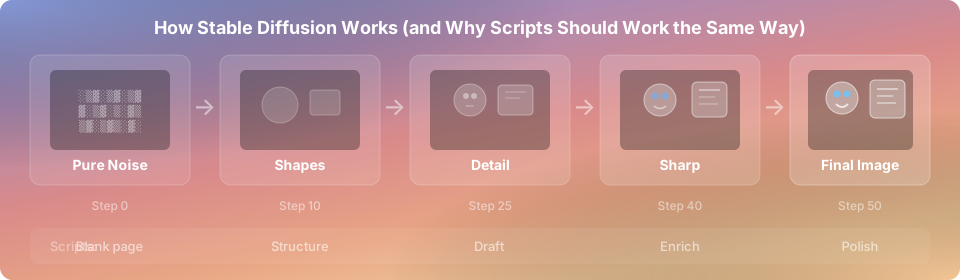
Same thing for scripts. I call this "narrative diffusion." Each pass refines the last. The difference vs single-shot prompting is night and day.
## Why Single-Pass Produces Slop
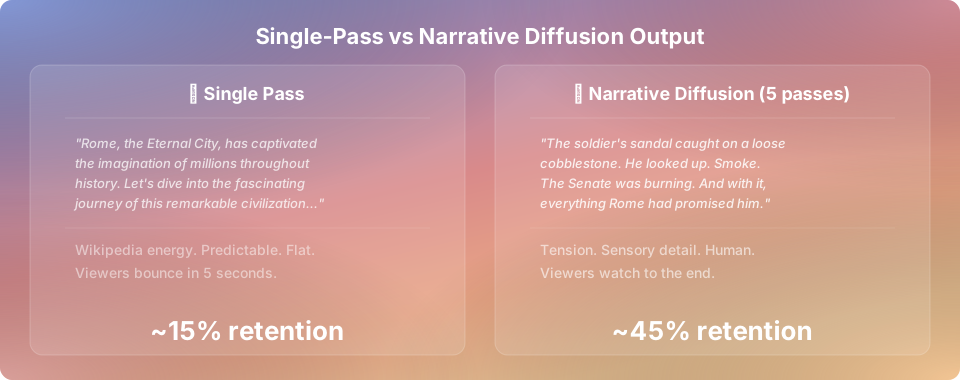
"Write me a 10-minute script about the history of Rome." You know what you get back. "Rome, the Eternal City, has captivated the imagination of millions." Wikipedia energy.
The problem isn't the model. You're asking it to outline, write, enrich, polish, and ensure visual consistency in one prompt. So it does all five badly. This is like asking a chef to prep, cook, plate, and serve simultaneously. You get a microwave burrito.
## Model Ranking
The model matters more than people think.
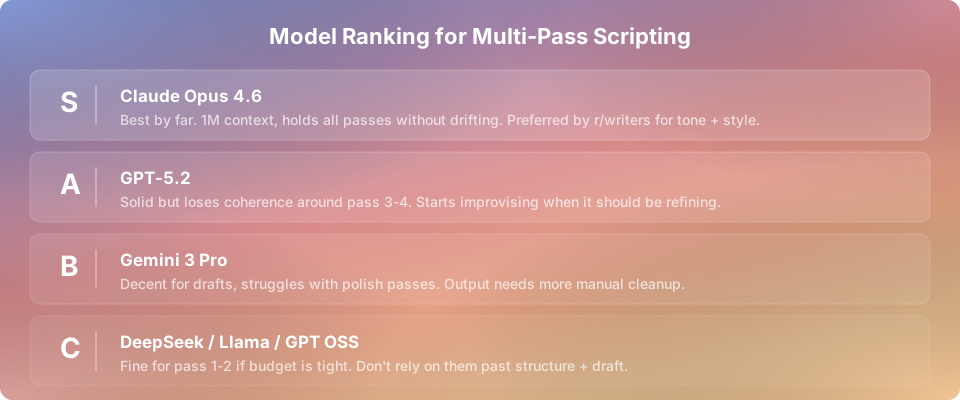
| Model | Multi-pass capability | Context | Cost per script |
| ------------------ | --------------------------- | ----------- | --------------- |
| Claude Opus 4.6 | Excellent, holds all passes | 1M tokens | ~$0.30-0.50 |
| GPT-5.2 | Drifts pass 3-4 | 256K tokens | ~$0.20-0.40 |
| Gemini 3 Pro | Struggles with polish | 2M tokens | ~$0.15-0.30 |
| DeepSeek/Llama/OSS | Pass 1-2 only | Varies | Free-$0.05 |
**Opus** holds multi-pass instructions without drifting and the language quality is noticeably better. Most script pros on r/writers prefer Anthropic for tone and voice. **GPT-5.2** starts "improvising" around pass 3-4, which is a polite way of saying it forgets your instructions. **Open source** is fine for passes 1-2 if budget's tight.
One clean Opus run beats three messy GPT runs that need manual fixing. The cheapest tool is the one that works the first time.
## How Many Passes Do You Need?
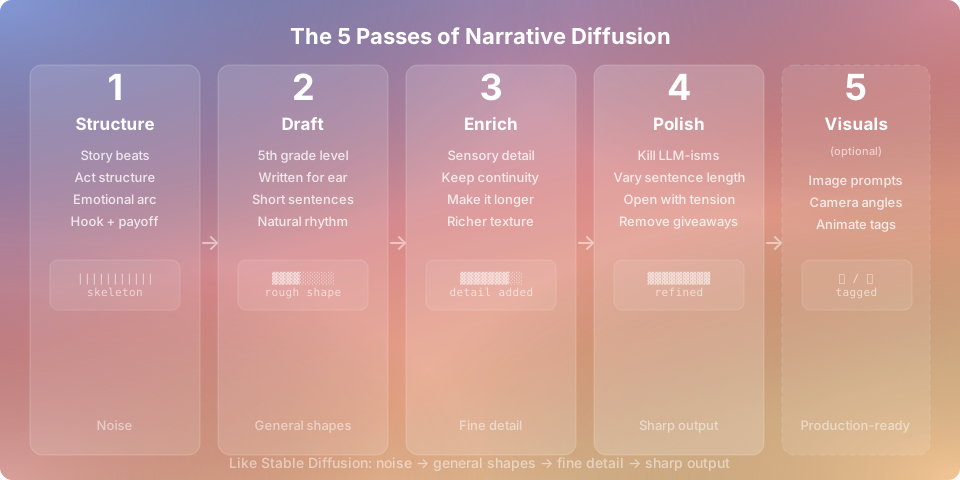
Not every piece of content needs all five. A quick explainer or kids' bedtime story? Passes 1 and 2 are enough.
- **2 passes** (structure + draft): Short-form, simple stories, explainers. Gets you 80% there.
- **3-4 passes** (+ enrich/polish): Long-form narratives, documentaries. "Fine" becomes "people actually finish watching."
- **5 passes** (+ visual consistency): Full video pipeline with standalone image prompts, consistent art style, and animate/static tagging.
OpenSlop lets you configure this per video. Don't overthink it.
## The Passes
---
### Pass 1: The Kernel
You're not writing yet. You're outlining a story that has an actual arc.
> Briefly and succinctly outline an engaging **\[GENRE, e.g. kids' bedtime story, true crime documentary\]** with a high-concept premise, characters, themes, conflict, twists, and a resolution. The story should be about: **\[SEED IDEA, e.g. Little Red Riding Hood, the fall of Rome\]**
Genre matters upfront because a bedtime story and a true crime doc have completely different structure. This pass should give you: a hook, 3-5 act structure, characters to anchor to, at least one twist, and a payoff that ties back to the hook.
If the skeleton is weak, no amount of pretty language saves it. It's like building a house without a blueprint. You can start nailing boards together, and for a while it'll look like progress. Then you realize the bathroom is where the kitchen should be.
You never skip pass 1. The kernel is non-negotiable.
---
### Pass 2: The Draft
This is where writing happens. The system prompt we use in OpenSlop:
> **You are a world-renowned audiobook narrator and storyteller in the style of \[AUTHOR, e.g. George R. R. Martin\].** Write with vivid sensory detail, stark human conflict, moral ambiguity, and textured worldbuilding. Reveal the story in layered revelations: first the conflict, then the deeper truths beneath it, like peeling an onion. Always write in **third person**, use **character dialogue** to drive the story, in a style for **audio narration** at a **5th-grade reading level**.
The author style is configurable. GRRM steers toward moral ambiguity and consequences over simple good-vs-evil. Swap in whoever fits your content: Roald Dahl for kids' stories, David Attenborough for nature docs, Erik Larson for historical narrative.
The system prompt also includes pre-writing requirements (theme, complex characters with flaws, setting with atmosphere), narration rules (hooking intro, show-don't-tell, escalating stakes, balanced pacing), and XML tagging for character dialogue with emotion attributes, image prompts, sound effects, and music cues so the output is machine-parseable.
User prompt: **Write a complete detailed story about: \[PASS 1 OUTPUT\]**
Why this works: **"5th-grade level"** forces clarity your audience can follow while doing dishes. **"Audio narration"** kills blog-style prose that dies as voiceover. **"Character dialogue"** keeps description minimal, at most 2 lines between dialogues. The **author style** anchors the model's tone so it doesn't default to generic AI prose.
For simple content, this might be your last pass.
---
### Pass 3: Enrich (Optional)
> Rewrite the story with richer detail and make it longer. **Keep all established events, motivations, and continuity intact.** Add sensory imagery, clearer scene-setting, additional short scenes for worldbuilding or tension without altering the plot. More dialogue, more sounds, more atmosphere. Do not remove detail.
**"Keep all established events intact"** is the most important phrase here. Without it the model WILL rewrite everything. It'll shuffle scenes, drop characters, and "improve" your arc into something unrecognizable. I learned this the hard way. Twice.
Before: _"The soldier walked through the city. It was destroyed."_
After: _"The soldier's sandal caught on a loose cobblestone. Ash in the air, thick enough to taste. Copper pots scattered like discarded crowns. Somewhere behind him, a dog barked at nothing."_
Same events. The first tells you what happened. The second puts you there.
---
### Pass 4: Polish (Optional)
> Transform into a fully realized audio-drama narrative. Preserve all events and continuity. Make the prose feel hand-crafted. Deepen sensory detail. Strengthen conflict and tension. Tighten sentences, improve rhythm, remove redundancy. Fix continuity errors. Deliver a final, professionally edited manuscript. Do not remove detail.
This is where you hunt down every LLM-ism and put it out of its misery. Every model has verbal tics. The kill list:
- "delve" / "dive in" / "it's worth noting" / "moreover"
- "journey" / "tapestry" / "landscape" / "let's explore"
- "fascinating" / "remarkable" / "groundbreaking"
- Any sentence starting with "Imagine..." or "But here's the thing..."
**Vary sentence length.** AI defaults to medium-length sentences of equal size. Short punches. Then a longer sentence that rolls and builds momentum and carries the reader through. Then short again. Monotone sentence length is the uncanny valley of writing.
**Open with tension, not context.** "Rome was founded in 753 BC" = boring. "The knife was still wet when Brutus turned to face the Senate" = hooked.
---
### Pass 5: Visual Consistency (Optional)
> Review and rewrite every image prompt so each one works as a **standalone prompt** outside the context of the story. Every prompt must include: full character descriptions (age, build, hair, clothing, distinguishing features), a locked art style directive, camera angle, lighting, mood, and setting details. Ensure visual continuity across all scenes: consistent character appearances, consistent color palette, consistent art style. Tag each scene as "animate" or "static."
This is the pass most people skip, and it's why their videos look like five different AI models collaborated on a group project.
The problem: passes 2-4 produce image prompts that make sense _in context_ ("the old man stepped into the room") but are useless as standalone generation prompts. Your image model doesn't have the story context. It doesn't know who "the old man" is. So you get a different old man in every frame.
**Every prompt must be self-contained.** Instead of "the old man stepped into the room," you need "a gaunt 70-year-old man with a silver beard, deep-set brown eyes, and a tattered navy wool coat, stepping into a dimly lit stone chamber with arched doorways and flickering candlelight, cinematic wide shot, warm amber lighting, oil painting style." Same character description, same art style directive, every single scene.
**Lock your art style.** Pick one and stamp it on every prompt: "Studio Ghibli watercolor," "hyper-realistic cinematic," "dark oil painting." If even one prompt drifts, that scene sticks out like a stock photo in a Pixar movie.
**Check your cuts.** Scene A's character wears a red cloak. Scene B's character better still be wearing a red cloak. Models don't track continuity across separate generations. You have to enforce it manually in every prompt.
**"Animate"** = AI video generation (~$0.07 each). Key dramatic moments, action, opening hook. **"Static"** = still image with Ken Burns (free via ffmpeg). Dialogue, establishing shots, anything voiceover carries. 80-90% should be static. Front-load animations in the first 2 minutes for retention.
## Common Mistakes
**Skipping pass 1.** You go straight to writing and get a Wikipedia article, not a story.
**Combining passes.** "Write me a polished script with consistent image prompts." Each pass has one job. The moment you ask for multiple things the model compromises on all of them. You wouldn't ask your barber to also fix your car.
**Forgetting "keep events intact."** Without this guardrail the model treats enrichment as an invitation to rewrite your plot. Models are like interns: enthusiastic, capable, but they'll redecorate your office while you're at lunch.
**Wrong model for the wrong pass.** Open source for pass 4 polish means more time fixing LLM-isms than if you'd just paid for Opus. Penny wise, pound foolish.
**All passes in one prompt.** "Do passes 1-4 in sequence." The model combines them mentally and produces something that's none of the above. Each pass needs its own prompt with the previous output as input.
## Pro Tips
**Save pass outputs separately.** If pass 4 goes sideways, restart from pass 3, not scratch.
**Run pass 4 twice if needed.** Diminishing returns after two. If you need three, the earlier passes are the problem.
**Use Claude's 1M context.** Feed ALL previous outputs into each subsequent pass. Models with smaller windows start forgetting, and forgetting is where coherence goes to die.
**Temperature matters.** Higher for pass 1 (creative ideas). Lower for pass 4 (precise editing).
**Batch your scripts.** Run pass 1 for 5 videos, then pass 2 for all 5, and so on. Assembly line beats artisanal at scale.
## Bottom Line
Narrative diffusion is a series of prompts run in sequence. Sometimes two, sometimes five. But even at its simplest, the difference vs single-shot prompting is the difference between content people bounce from in 5 seconds and content they watch to the end.
This entire method ships with OpenSlop (free and open-source). Prompts, pass configuration, XML tagging, all of it. Pick your genre, drop in a seed idea, choose your passes, and the pipeline handles the rest.
Try it on your next script.
---
Canonical URL: https://openslop.ai/blog/narrative-diffusion-the-multi-pass-scripting-method
---
# Why Every AI Video Tool Feels Broken
> I've tried every AI video tool on the market. They all promise the same thing and they all fall short in the same ways. Here's what's actually going wrong.
_Published 2026-02-17 by Umair_
"Its a slot machine with a subscription fee."
— Umair
I've spent six months trying every AI video tool that exists. OpenArt, Higgsfield, AutoShorts, StoryShort, Vimerse, Vadoo, Hypernatural, Freepik. The whole graveyard. Signed up for free trials, paid for pro plans, joined Discord servers where the founders post rocket emojis every time they ship a button color change.
Every single one let me down. Not because the AI is bad (the underlying models are genuinely incredible now) - instead; the tools wrapping them are the problem.
## The Pitch
You know the landing page. "Create stunning AI videos in minutes." Demo video looks cinematic. You think _finally, this is the one._
You sign up, type your own prompt, and the output looks like a stock photo slideshow assembled by someone who's never watched a YouTube video. Every. Single. Time.
## How They All Break
**They treat every video the same.** A kids bedtime story and a true crime documentary have nothing in common. Different pacing, different visuals, different audio, different editing. But you get the same template dropdown and the same five transitions. Its like a restaurant that serves every cuisine but only owns one pan.
**The quality is artificially capped.** When you call image gen APIs directly you control everything. Seeds, aspect ratios, style references, model selection per scene. These tools abstract all of that away for "simplicity" and the result is that generic oversaturated AI look you can spot from across the room.
Creators who call APIs directly and assemble with ffmpeg produce better output at a fifth of the cost. Funny how that works.
**You can't fix anything.** One bad image in scene 14? Regenerate the entire video. Wrong pacing on the third act? Regenerate. Hope the dice roll better this time.
Thats not a creative tool. **Its a slot machine with a subscription fee.**
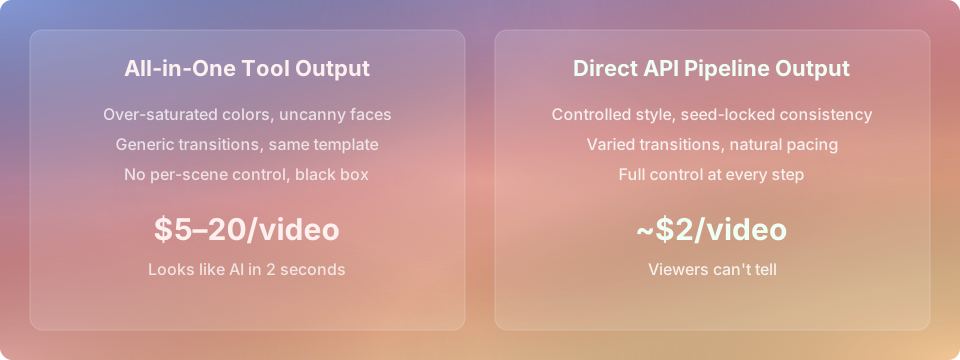
All-in-One Tool Output: $5-$20/video, clearly AI, no stylistic control
Direct API Pipeline Output: less than $2 per video, full stylistic control
## What Creators Actually Do Instead
I've talked to 50+ AI video creators. Every single one has built some frankensteined version of their own pipeline.
Janky Python scripts. Make.com/n8n automations that timeout every third run. Google Sheets wired to Zapier wired to API calls wired to prayers.
What they actually want is dead simple: the quality of direct API access without needing a CS degree to set it up.
Not a dumbed-down wizard. Not templates. A real tool where you pick which model generates each scene, decide what gets animated vs ken burns, swap individual images without nuking everything, and see what it costs before you commit.
| Feature | All-in-one tools | DIY pipeline | OpenSlop |
| ----------------------------- | ---------------- | ------------ | -------- |
| Per-scene model control | No | Yes | Yes |
| Swap individual assets | No | Yes | Yes |
| Ken burns vs animation choice | No | Yes | Yes |
| No-code friendly | Yes | Lol | Yes |
| Cost per video | $5-20 | ~$2 | ~$2 |
## The Gap
The market has two halves with nothing in between.
**Left:** Expensive all-in-one tools ($30-100/mo) producing content you'd be embarrassed to publish.
**Right:** Raw API access producing great content, accessible only to people who can write code.
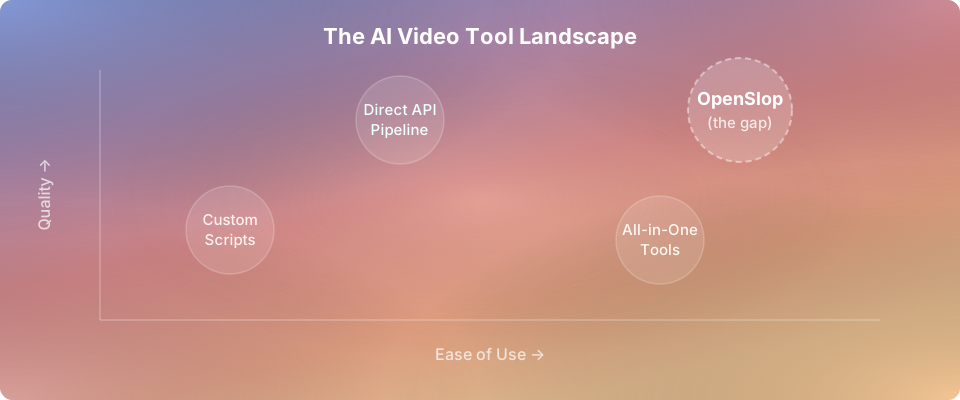
Most creators want to be on the right. Most creators cant get there. The few who can have an absurd competitive advantage. $2 videos that look better than what someone else pays $100/month for.
## Why OpenSlop Exists
We're building the missing middle. **Open source. Free.** No black box, no templates, no $50/month "pro tier" that unlocks the features that shouldve been there from the start.
The AI models have been good enough for months. The bottleneck was always the orchestration. Connecting models intelligently, giving creators actual control, and not extracting rent for the privilege.
Built by someone who runs a daily AI channel and got tired of every tool being almost good enough. If you're currently duct-taping APIs together with Python scripts and caffeine, this is for you.
---
Canonical URL: https://openslop.ai/blog/why-every-ai-video-tool-feels-broken
---
# The No-BS Guide to AI Video Creation at Scale
> Everything I've learned from running a daily AI YouTube channel, talking to 50+ creators, and building an automated pipeline from scratch. Highly opinionated. Your mileage may vary but probably won't.
_Published 2026-02-15 by Umair_
"The difference between a $200 video and a $2 video is knowing that 80% of it
doesnt need to be AI generated video at all."
— Umair
Heres what nobody tells you: the channels pumping out 25-minute documentaries 3x/week are NOT generating every frame as video. This is the single biggest misconception in the AI video space and its costing people thousands of dollars a month.
I know this because I run a daily AI YouTube channel, talked to 50+ creators doing the same thing, and built an automated pipeline from scratch.
## 💸 The Big Misconception That's Wasting Everyone's Money
You look at these channels and think "wow they must be generating hundreds of video clips per episode." Nope.
What they're ACTUALLY doing:
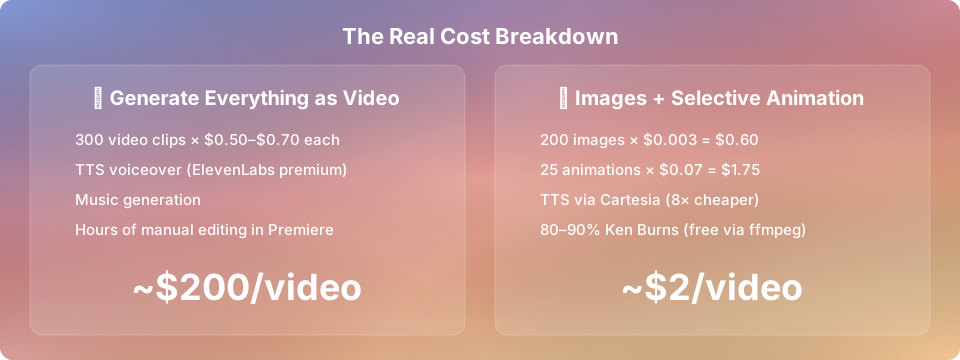
- Generate 150-200 still images for the entire video
- Animate ONLY 10-20% of those for key dramatic moments
- Ken Burns effects (pan/zoom via ffmpeg) on the remaining 80-90%. This is free
- The "cinematic" feel comes from editing, not generation. Slow zooms, crossfades, good pacing with voiceover
You think you need 300 video clips. You actually need 200 images and 25 animations. Thats the difference between a $200 video and a $2 video.
Two dollars. 🤯
Smart variation I stole from a German channel called "Ungesagt": front-load your animated scenes in the first 2 minutes to hook viewers, then coast on Ken Burns for the rest. Algorithm cares about retention in the first 30-120 seconds. After that, if your voiceover is good, nobody notices. Been doing this for months and literally nobody has commented on it.
## 🔄 The Pipeline (Single Prompt to Finished Video)
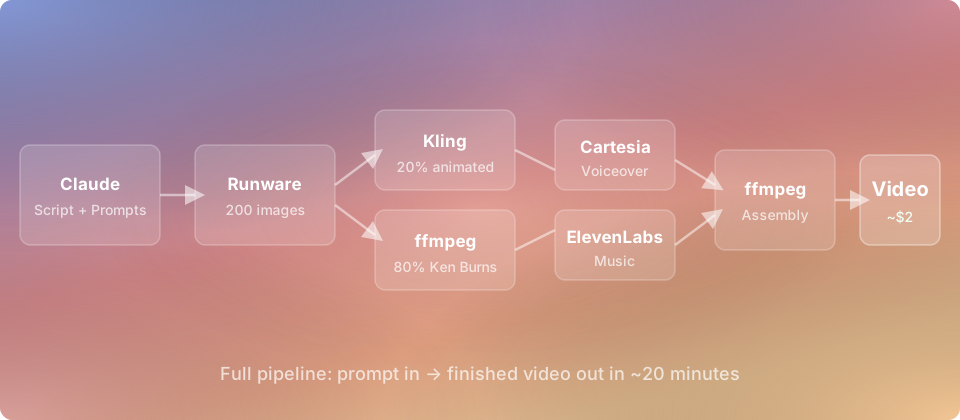
My exact workflow - one prompt in, finished video out in ~20 minutes on a cheap laptop:
1. **Claude Opus 4.6** generates full script + per-scene image prompts as SSML (Speech Synthesis Markup Language). This is NOT a single prompt. More on multi-pass scripting below.
2. **Runware API (z image turbo)** bulk generates all images. $0.003 per image. 100 images = $0.30. Thirty cents.
3. **Selective animation**: 10-20% of images get animated via Kling or SeedDance Pro Fast. ~$0.07 per 10s clip.
4. **Ken Burns effects** on the remaining 80-90% via ffmpeg. Free. Randomized presets. If you hardcode one motion style it looks robotic immediately.
5. **Cartesia** for TTS voiceover.
6. **ElevenLabs** for music generation, cached in a **Pinecone vector DB**. Check cosine similarity before generating new music. If something close enough exists, reuse it. Cuts audio costs from ~$150/mo to ~$40-50.
7. **ffmpeg** assembles everything. Concat demuxer + xfade filter for transitions, audio sync, subtitle burn-in.
Total cost: ~$2 per video. One Node.js script. No Premiere. No CapCut. No dragging clips into a timeline like some kind of animal.
## 🧰 The Tool Stack
### Scripts: Claude Opus 4.6
Not ChatGPT. Not Gemini. Claude Opus produces genuinely better narrative scripts. More texture, more natural pacing, follows complex multi-pass instructions without drifting.
ChatGPT scripts all sound the same. That overly enthusiastic, bullet-point-brained, "lets dive in" energy. You know EXACTLY what Im talking about. 🙄
### TTS: Cartesia Sonic 3
~8x cheaper than ElevenLabs and the quality is close.
Key feature most people miss: **emotional tags**. Sonic 3 supports tags that make the voice sound excited, serious, whispering etc in different sections. A monotone AI voice is the #1 tell that content is AI generated. Varying emotional delivery makes it sound dramatically more natural.
Save ElevenLabs for music. Dont waste it on TTS.
### 🖼️ Images: z image turbo via Runware
$0.003 per image. Batch hundreds in parallel via API. No GPU needed.
Why not Leonardo? API consistency varies wildly between batches. People report 40%+ reject rates with Lucid Origin. My reject rate with z image turbo is around 10-15%.
Why not Midjourney? Not API-friendly for automated pipelines.
Why not Google models? They inject **invisible SynthID watermarks** that YouTube can detect. Massively increases your chances of being flagged. Most people dont know this. Switch immediately if youre using these.
| Tool | Cost per image | API batch support | Consistency | SynthID risk |
| ----------------------- | -------------- | ----------------- | -------------------- | ------------ |
| Runware (z image turbo) | $0.003 | Yes, parallel | Good (10-15% reject) | None |
| Leonardo (Lucid Origin) | ~$0.01 | Yes | Poor (40%+ reject) | None |
| Midjourney | ~$0.02 | No | Excellent | None |
| Google Imagen | ~$0.005 | Yes | Good | **Yes** |
| DALL-E 3 | ~$0.04 | Yes | Good | None |
### 🎬 Animation: Kling / SeedDance Pro Fast
~$0.07 per 10s clip. Use selectively.
**Kling** handles subtle motion better than Wan. If you need calm scenes Kling actually listens when you ask for low motion intensity. Wan assumes everything alive should be moving aggressively, like a toddler who just discovered Red Bull.
For truly zero motion: skip video gen entirely. AI image + subtle Ken Burns. Viewers cannot tell the difference when theres voiceover holding their attention.
### 🎵 Music: ElevenLabs + Pinecone Cache
Nobody else is doing this:
1. Generate music with ElevenLabs
2. Embed audio characteristics into Pinecone
3. Before generating new music, check cosine similarity against existing library
4. Close enough match? Reuse it
5. Only generate new tracks when nothing matches
Cut my audio costs 60-70%. Dont use the same track for every video though. YouTube flags that as repetitive content.
| Service | Use case | Cost | Quality |
| ------------------------ | -------------------- | --------------------------- | --------------- |
| Cartesia Sonic 3 | TTS narration | ~8x cheaper than ElevenLabs | Near-ElevenLabs |
| ElevenLabs | Voice cloning, music | Premium | Best in class |
| Chatterbox (open source) | Local TTS | Free | Getting close |
| Fish Audio (open source) | Local voice cloning | Free | Solid |
### 🔨 Assembly: ffmpeg
Free. Open source. Runs on anything. People spending hours in Premiere or CapCut are doing what a script can do in seconds. 👨🍳💋
## ✍️ Multi-Pass Scripting (Why Your Scripts Sound Like AI)
Most impactful technique I use. Most people skip it.
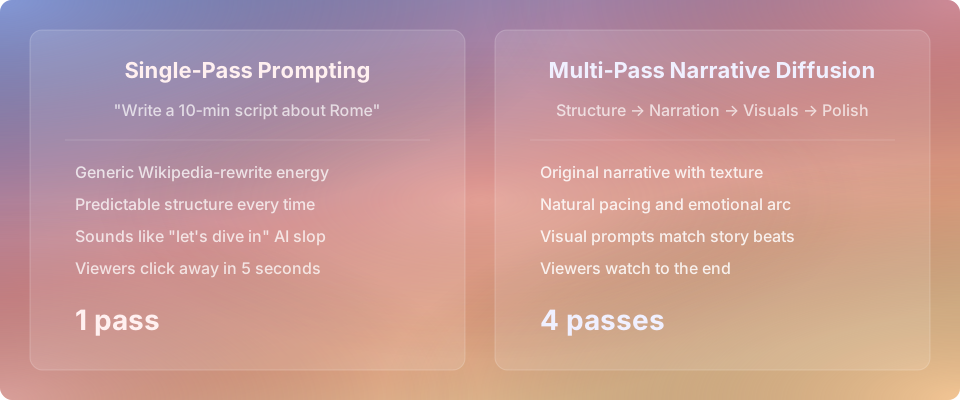
**Single-pass prompting** (what 95% of people do): "Write me a 10-minute script about the history of Rome." Generic. Predictable. Wikipedia-rewrite energy.
**Multi-pass "narrative diffusion"** (what actually works):
1. **Pass 1, Structure**: Story beats, act structure, emotional arc, hook, payoff. Just the skeleton.
2. **Pass 2, Narration**: Voiceover text written for the ear not the eye. Short sentences. Natural rhythm.
3. **Pass 3, Visual descriptions**: Per-scene image prompts. Camera angles, lighting, composition. Separate pass because visual thinking and narrative thinking are different skills.
4. **Pass 4, Polish**: Cut anything that sounds AI-ish. Vary sentence length. Remove "delve". Remove "lets dive in". Remove "its worth noting". Remove every phrase that screams "a language model wrote this".
Claude Opus is particularly good at this because it holds complex multi-step instructions without drifting. GPT tends to forget earlier instructions by pass 3-4 and starts improvising. Which is a polite way of saying "making stuff up."
## 🎭 Character Consistency
The #1 complaint I hear from creators. And the advice online is terrible.
### The Storyboard Pipeline
**DO NOT** generate images scene by scene. Thats where everything falls apart.
Instead:
1. Generate ALL images for the entire video upfront in one batch
2. Pass same character description + reference image into every prompt
3. Lock seeds where possible (Runware supports this)
4. Review the full batch for consistency
5. Fix outliers
6. THEN animate
Fundamentally different mental model. Youre making a storyboard, not going scene by scene. The moment you start generating sequentially and hoping theyll match, youve already lost.
### Character Design
**Simpler = more consistent.** Detailed realistic faces drift like crazy. Stylized/illustrated characters stay consistent 10x better.
**Reference images are mandatory.** Generate one hero image of your character that you love. Pass it into every subsequent prompt.
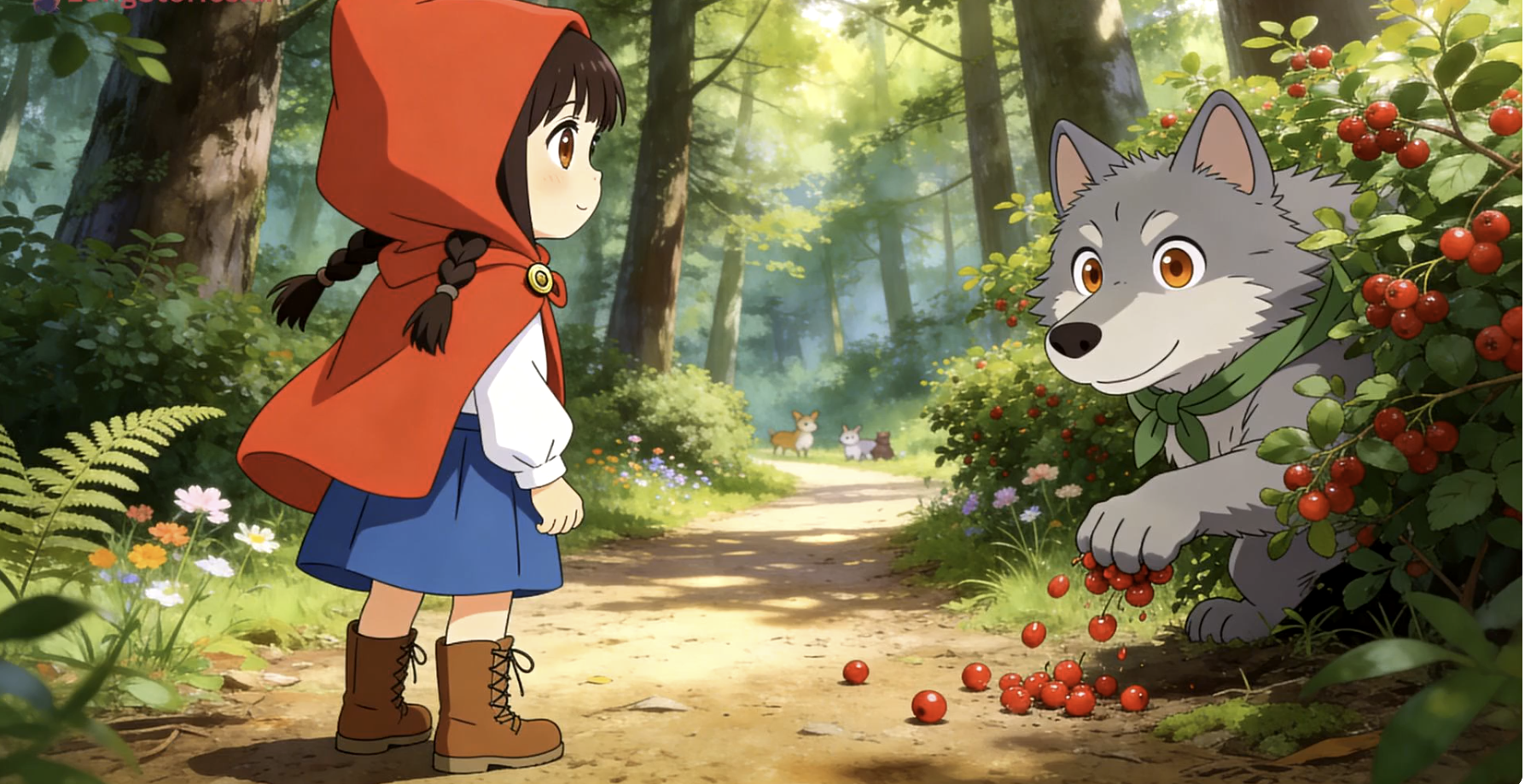
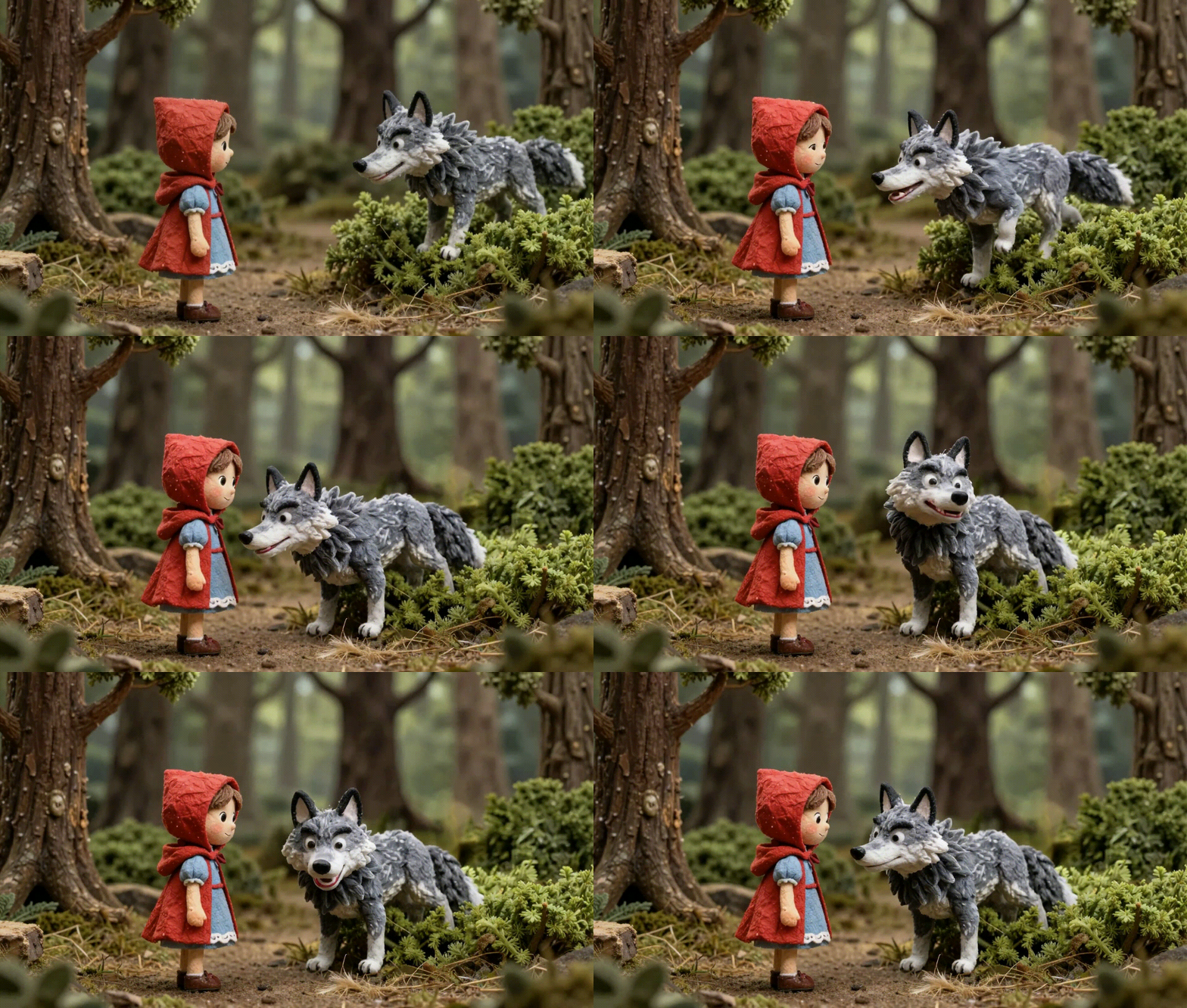
**Be absurdly specific.** Dont say "a girl". Say "a 10-year-old girl with shoulder-length brown hair, blue dress with white collar, simple anime style, warm skin tone, round face, soft lighting from the left."
| Generation method | Scene 1 | Scene 2 | Scene 3 |
| --------------------------- | -------------------------------------------------------------------- | ------------------------------------------------------------------------ | ------------------------------------------------------------------------ |
| Scene-by-scene generation | 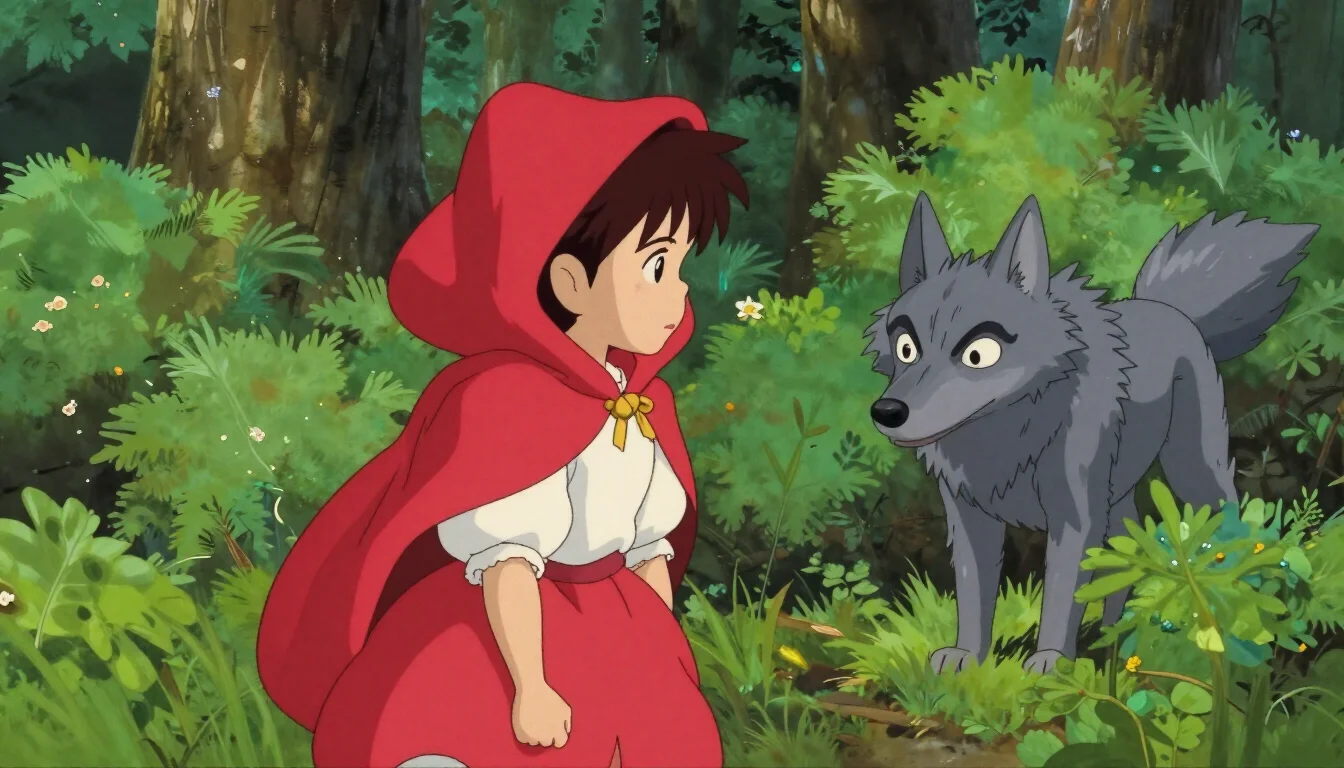 | 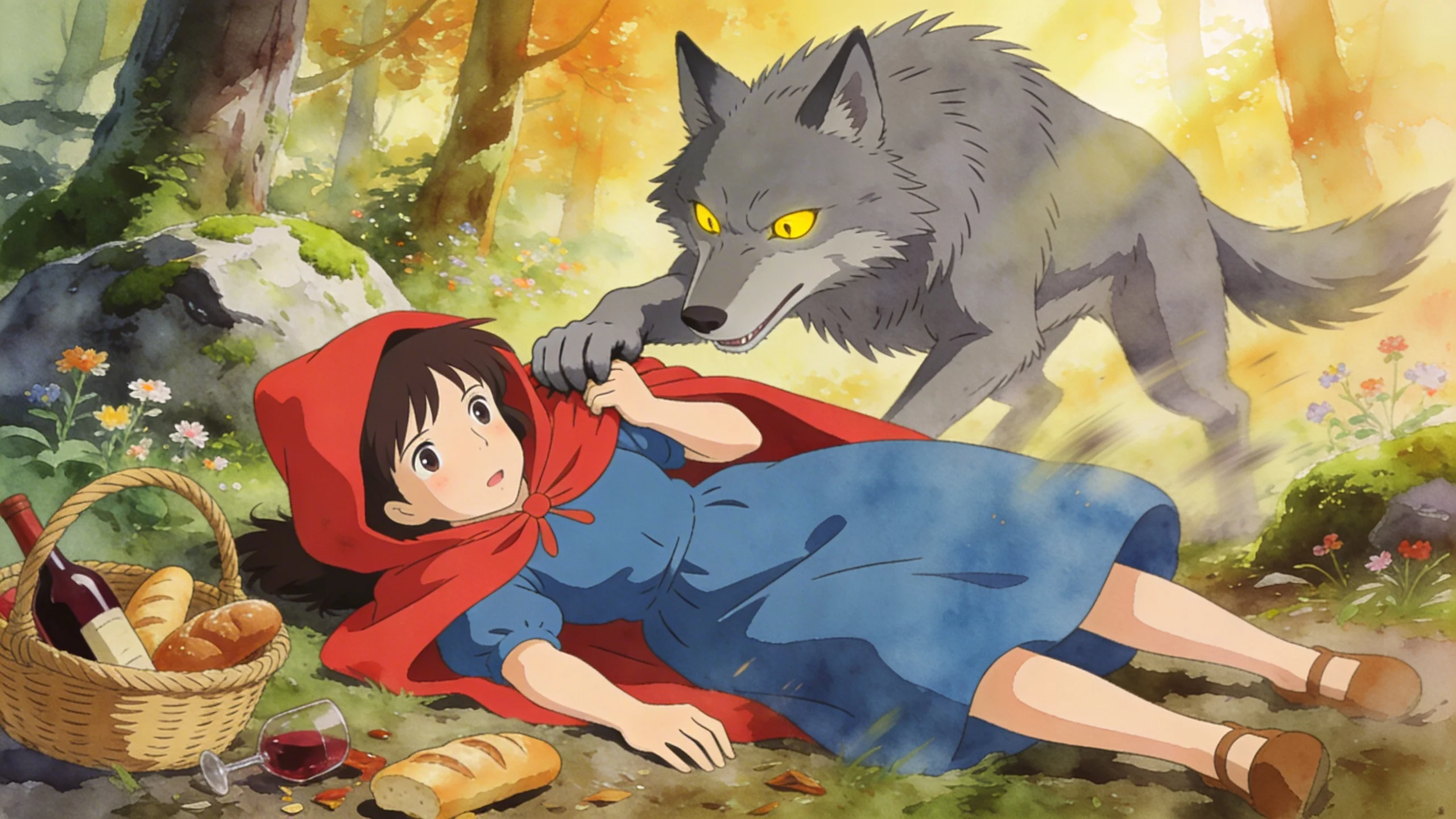 | 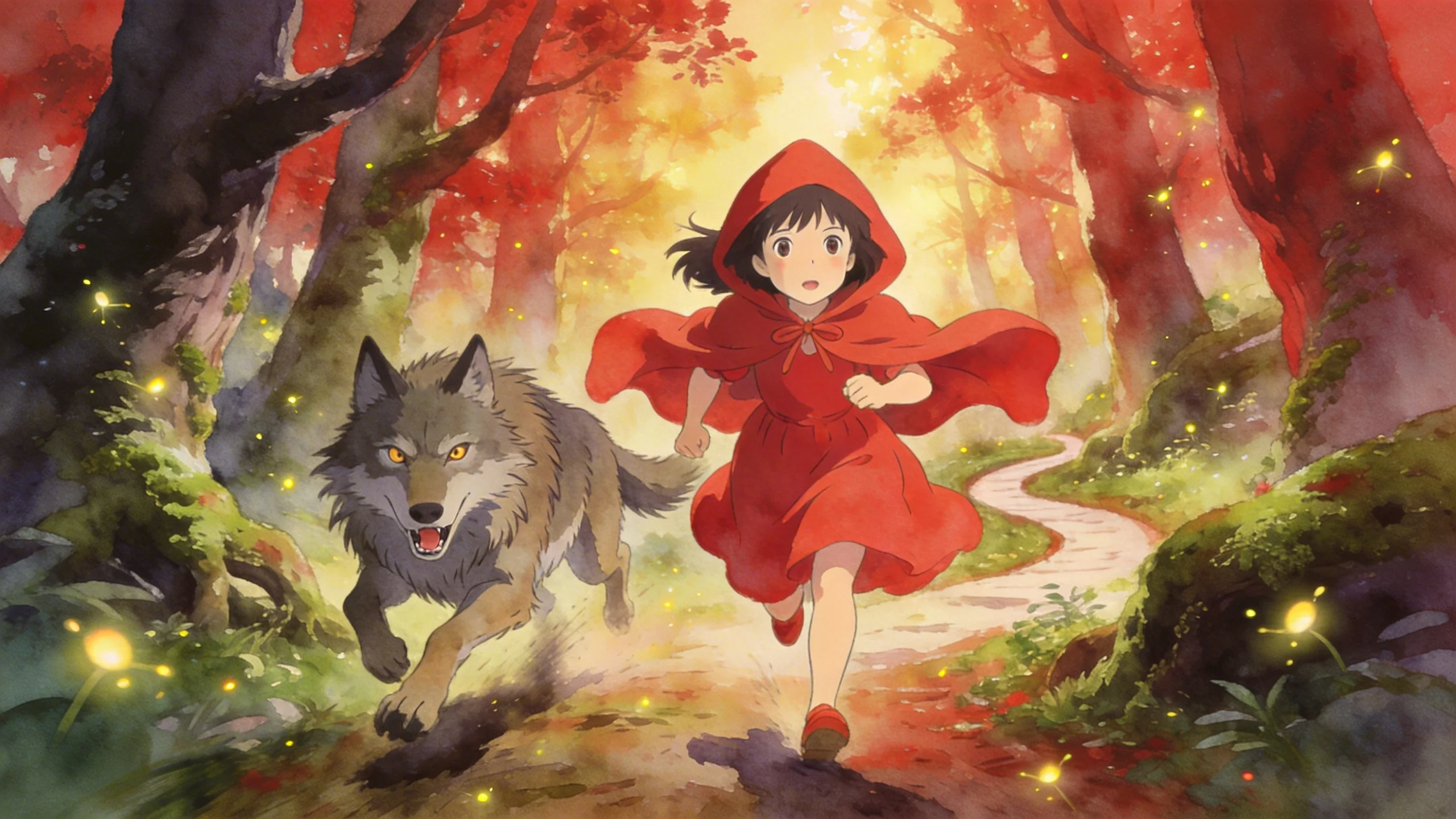 |
| Storyboard batch generation |  | 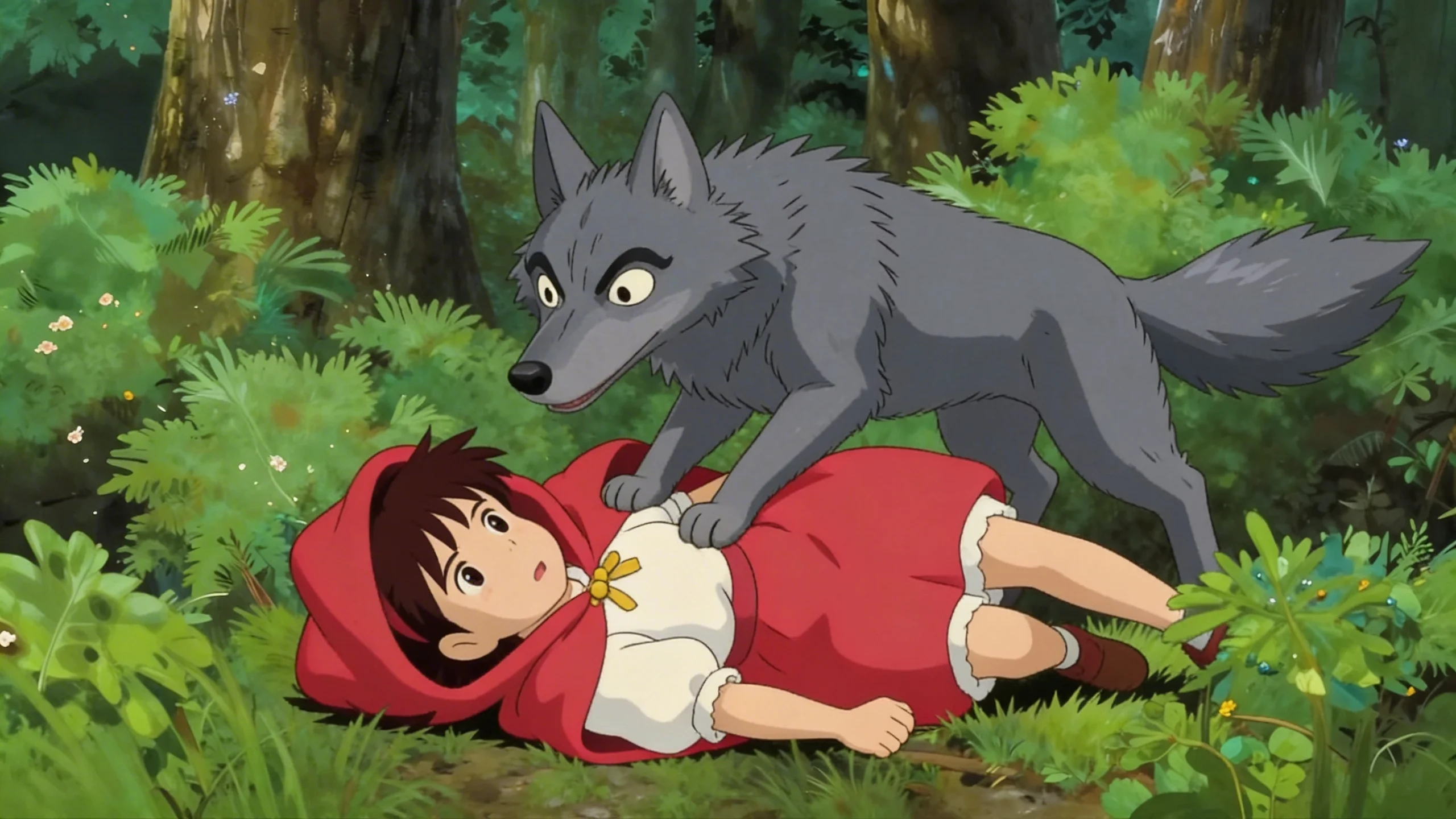 | 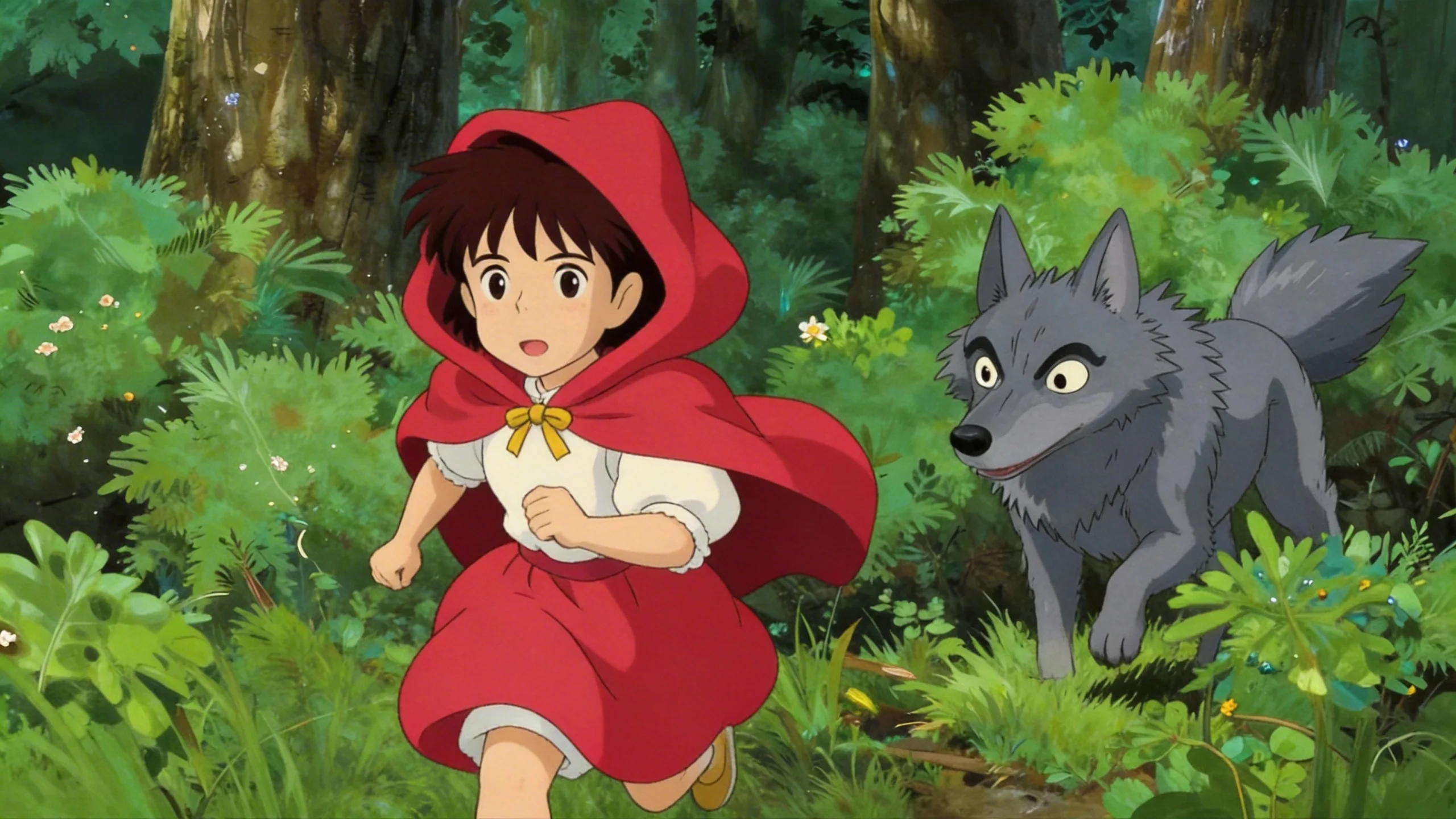 |
## ⚠️ What Gets AI Channels Demonetized
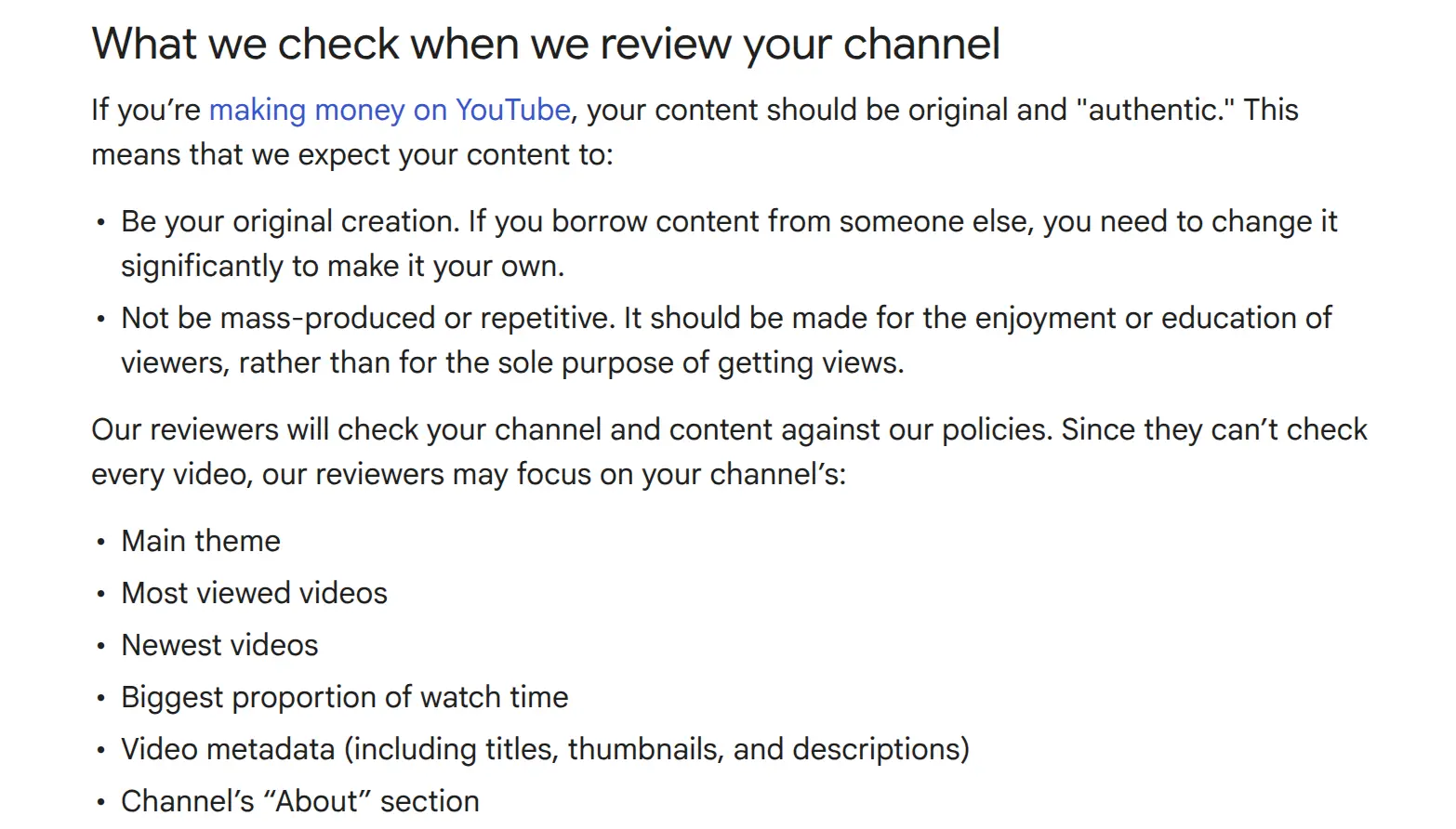
YouTube isnt cracking down on faceless AI content. Theyre cracking down on **low-effort repetitive content** that happens to be AI. Huge difference.
**Reused Content.** Copying Reddit stories, other peoples gameplay even "no copyright" stuff, regurgitating Wikipedia. YouTube flags all of it.
**The Template Problem.** Every video looks like it came from the same template with different words? Youre dead. Vary your editing style, transitions, pacing, color grading, music. This is why randomized Ken Burns presets matter. Theyre not aesthetic choices. Theyre survival tactics.
**No Human Creative Input.** YouTube wants a human directing creative decisions. Writing prompts, curating images, selecting scenes for animation, reviewing output before publishing. That counts. Document your process.
**SynthID Watermarks.** Google image models inject invisible watermarks YouTube can detect. Least known monetization risk. Easiest to fix. Stop using Google models.
**Voice Cloning Real People.** Dont. Create original AI voices.
## 🗑️ Why All-in-One Tools Suck
Tried them all. OpenArt, Higgsfield, AutoShorts, StoryShort, Vimerse, Vadoo, Hypernatural, Freepik. A dozen more Ive mercifully forgotten.
Nobody on r/aitubers recommends any of them. That should tell you everything.
Output quality isnt there. Customization too limited. One-size-fits-all approach. $30-100/mo for output you could produce better at $2/video calling APIs directly. And you cant see or control whats happening under the hood.
Market is split in half: expensive tools that output generic stuff, and powerful individual models that need technical skill to combine. Creators want the power of the second with the simplicity of the first.
Thats the gap. Thats why were building OpenSlop.
## ⚖️ No-Code vs Code
### No-Code (Make/n8n/Airtable)
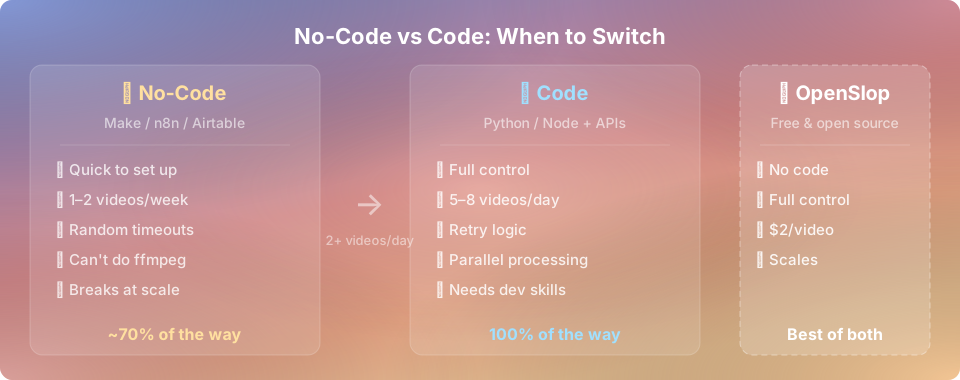
Gets you ~70% there. Fine for 1-2 videos a week. Falls apart at scale. Execution limits, latency between modules, random timeouts, cant do ffmpeg, terrible error handling. At 2+ videos/day its a nightmare.
### Code (Python/Node + APIs)
More reliable, cheaper, fully customizable. Retry logic, parallel processing, queueing. At 5-8 videos/day its the only option.
### 🤔 Cant Code?
Learn basic Python. Claude can write 90% of it for you. Youre mostly gluing API calls together. Less scary than it sounds.
Or wait for OpenSlop. **Free, open source**, built for exactly this.
## 🎯 Bottom Line
The people making real money with AI video in 2026 arent using magical tools that dont exist yet. Theyre using the same APIs available to everyone, combined intelligently into a pipeline that costs $2 per video instead of $200.
The "secret" is that 80% of your video doesnt need to be AI generated video at all. It needs to be AI generated images with smart camera movements.
The other secret is that none of this is actually secret. Most people would just rather spend $99/month on a tool that promises to do everything than spend a weekend learning how the sausage gets made.
Your call. 🎤⬇️